-
-
Sort through our administrative resume examples to see what works best for you.
-
Our sales resume examples can help you write the best possible resume.
-
Explore our food service resume examples to show your skills effectively.
-
Start crafting your job-winning resume with our teaching resume examples.
-
-
-
Use our administrative cover letter examples for ideas on writing your own.
-
Use our sales cover letter examples to effectively show your sales accumen.
-
Write your job-winning cover letter following our nursing cover letter examples.
-
Learn to tell your story in education using our teaching cover letter examples.
-





- Our customers have been hired by*


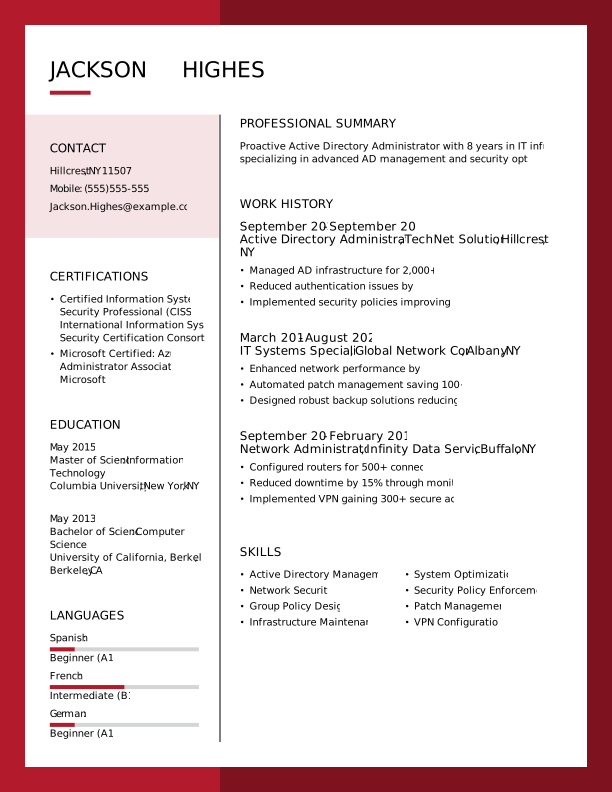
Entry-Level Active Directory Administrator Resume
This resume example is effective for recent graduates and career changers because it emphasizes technical skills, certifications, and achievements that demonstrate a strong foundation in active directory administration.

Why this resume works:
A strong academic foundation shows the candidate is well-prepared to transition into this role.

Mid-Career Active Directory Administrator Resume
This resume example is tailored for active directory administrators with substantial experience, aiming to elevate their careers into more advanced and specialized IT roles.
Why this resume works:
This applicant highlights a track record of improving outcomes across multiple settings.

Experienced Active Directory Administrator Resume
This active directory administrator resume showcases a wealth of experience, making it ideal for professionals looking to step into senior IT roles.
Why this resume works:
Leadership roles and advanced certifications underscore the ability to manage complex scenarios.

Looking for something else?
Create Your Standout Resume Today
Use our resume examples for inspiration on organization, color, and design—and learn how to summarize your active directory administrator skills and experience with confidence.
How to Write an Active Directory Administrator Resume
Understanding how to write a resume is important for an active directory administrator, as it allows you to showcase your unique value and expertise in the field rather than merely listing your technical skills.
In the upcoming sections, we will delve into a step-by-step approach to crafting your resume, covering essential components such as professional summaries, relevant work experience, certifications, and tailored resume tips that will help you stand out in the competitive job market.
Start with your contact info
The header section contains all your contact information and sits prominently at the top of your resume. Start by placing your name in a bold, large font to ensure it stands out. This is important as recruiters often skim through applications quickly, and a clear name presentation helps them identify your resume at a glance.
Next, include essential contact details such as your email address, phone number, and city and state of residence. While you don't need to provide your full address, this information is vital for making it easy for employers to reach you. Additionally, it aids applicant tracking systems (ATS), which may filter job seekers based on location.
Lastly, consider incorporating links to any relevant certifications or an online portfolio that showcases your skills in active directory management. These resources can improve your application by providing further evidence of your expertise and commitment to professional development in the IT field.
Write a strong professional summary
A professional summary serves as a brief yet effective introduction to your resume. It is typically located just below your contact information, making it one of the first elements recruiters notice about you.
This section should encapsulate your key qualifications, relevant skills, and genuine interest in the active directory administrator role. Tailoring it to each job application improves its effectiveness and shows employers that you understand their specific needs.
Explore various resume summary examples to inspire your own writing. They can provide valuable insights into structuring your summary and highlighting what matters most for this position.
Strong vs weak active directory administrator summary
Strong

"Detail-oriented active directory administrator with over four years of experience managing and securing user accounts in a large corporate environment. Proven ability to streamline processes and improve security protocols, resulting in a 30% reduction in unauthorized access incidents. Skilled in PowerShell scripting and group policy management, with certifications in Microsoft Certified: Azure Administrator Associate. Recognized for exceptional problem-solving skills and effective collaboration across IT teams."
Why this example works: This summary describes the job seeker's experience, includes measurable achievements like reducing unauthorized access incidents, highlights essential skills specific to active directory administration, and incorporates relevant keywords that align with job descriptions.
Weak

"Active Directory Administrator seeking a position to use my skills in IT. I have some experience with user management and enjoy working with technology."
Why this example doesn't work: This professional summary is weak because it uses vague language and fails to highlight specific technical skills, relevant experience, or measurable achievements related to the role of an Active Directory Administrator.

To craft a personal mission statement as an active directory administrator, emphasize how your expertise in managing user access and security aligns with the organization's commitment to integrity and efficiency. Highlight your proactive approach to improving system performance and user satisfaction, showcasing the unique value you bring beyond technical skills.
Share your work history
Your work history is a vital component of your resume. Listing your roles in reverse chronological order allows employers to see your most recent experience first, showcasing the skills and knowledge you've gained. This approach highlights your career progression.
When detailing your work experience, make sure to include:
- Job title and company name
- Employment dates (month and year)
- Daily responsibilities (What were your main tasks?)
- Notable achievements (What did you accomplish in each role?)
- Specific results (Quantify where possible, such as 'increased system uptime by 20%')
Keep in mind that using action verbs will bring energy and clarity to your work history.
Strong vs weak active directory administrator work history
Strong
Active Directory Administrator, Tech Solutions Inc.
2018–2023
- Managed user accounts and permissions for over 1,500 employees, ensuring compliance with security protocols.
- Implemented group policies that reduced login times by 40%, improving user productivity.
- Conducted training sessions for IT staff on best practices in Active Directory management, leading to a 25% decrease in support tickets.
Why this example works: This strong work history section highlights specific achievements and responsibilities that showcase relevant technical skills and administrative capabilities, demonstrating the unique value of the candidate.
Weak
Active Directory Administrator
Tech Solutions Inc.
- Managed user accounts and permissions.
- Handled server updates.
Why this example doesn't work: The weak work history example lacks specific details about the systems used, provides no context for the scale of user accounts managed or servers updated, and does not highlight achievements or impact.
Showcase your leadership skills on your resume by providing examples such as "Managed Active Directory user accounts for a team of 10 IT professionals" or "Led security audits that improved system compliance." These details highlight your ability to lead and improve organizational efficiency in IT environments.
Highlight your key skills
The skills section of your resume is important for highlighting your strengths as an Active Directory Administrator. Here's a rundown of essential skills and their significance in the field:
- Soft skills are personal attributes that show how you work with others, including problem-solving, communication, and collaboration. For active directory administrators, qualities like attention to detail, teamwork, and effective troubleshooting play an important role in ensuring a seamless user experience while also strengthening organizational security.
- Hard skills are specific technical abilities acquired through training, education, or hands-on experience. For an Active Directory Administrator, examples include user account management, group policy implementation, security permissions configuration, and troubleshooting directory issues.
- Technical skills for an Active Directory administrator include managing directory services and user access. Key examples are Microsoft Active Directory, PowerShell scripting, and Azure Active Directory for cloud-based management.
For those new to the role of an Active Directory Administrator, position your skills section right after your professional summary to highlight your abilities despite limited experience. Experienced professionals should place their skills section after work history, allowing their experience to showcase their expertise.
Top 15 skills for your active directory administrator resume
When crafting your resume as an Active Directory Administrator, it’s important to highlight skills that resonate with hiring managers. Focus on a mix of technical abilities and interpersonal skills, showcasing both hard and soft skills. Don’t forget to include transferable skills that can improve your candidacy across different roles.
Below is a list of the top 15 in-demand skills for Active Directory Administrators, reflecting what is popular among JobHero users. These transferable skills will help you stand out and demonstrate your qualifications.
Build your education section
For seasoned professionals with substantial experience, your work history should take precedence on the resume. If your roles don't require specific degrees, consider placing your education section toward the end or omitting it entirely if appropriate.
Conversely, recent graduates and those pursuing careers in specialized fields should highlight their educational background prominently. Include this section near the top of your resume to showcase relevant coursework, certifications, or academic achievements that align with job requirements.
Ultimately, tailor the placement of your education section based on how much it contributes to demonstrating your qualifications and fit for the role you're applying for. This strategic approach ensures that your most compelling credentials are front and center.
20 action verbs to add to your resume
Improving your resume with action verbs can significantly boost its impact by clearly conveying your experience and creating an engaging tone. These dynamic words highlight your contributions and achievements, making your application stand out.
For an active directory administrator role, choose action verbs that align with the technical skills in job listings. Words like "configured," "optimized," and "managed" showcase skill and relevance to potential employers.
- Configured
- Secured
- Troubleshot
- Orchestrated
- Streamlined
- Analyzed
- Optimized
- Facilitated
- Reviewed
- Directed
- Sustained
- Innovated
- Guided
- Executed
- Improved
- Trained
- Audited
- Integrated
- Oversaw
- Promoted
Consider additional resume sections
While your core resume provides the most critical information, adding targeted sections can showcase your unique qualifications. These sections help hiring managers quickly identify your technical skills, certifications, and accomplishments beyond standard resume sections.
Here are optional sections we tend to see on active directory administrator resumes:
- Technical skills: Include specific technologies and tools you are proficient in (Windows Server, PowerShell scripting, Azure Active Directory, etc.) to highlight your hands-on experience.
- Certifications: List relevant certifications such as Microsoft Certified: Azure Administrator Associate or CompTIA Security+ that validate your knowledge and skills.
- Project experience: Describe significant projects you've worked on involving Active Directory migrations or implementations, detailing your role and impact.
- Troubleshooting achievements: Showcase any improvements you’ve made in system performance or security incidents you've resolved.
- Professional associations: Mention memberships in organizations like the Association for Computing Machinery (ACM) or the International Association for Privacy Professionals (IAPP) to demonstrate your engagement with the industry.
5 Tips for Formatting Your Resume
Proper resume formatting is important for job seekers as it captures recruiters' attention and improves the chances of passing ATS filters. Using Ats-friendly resume templates can significantly improve your layout, ensuring your skills and experiences are highlighted.
1. Space your lines and margins
Proper spacing helps your resume look clean and organized. It plays a important role in guiding the reader's eye and ensuring key information stands out. Here's what works best:
- Set margins between 0.5" to 1.0" for optimal readability.
- Use single spacing for paragraphs, keeping bullet points clear.
- Increase spacing to 1.5" or double space between different sections.
2. Use a professional font
Selecting the right font for your resume is important in presenting a professional image. It's important to choose resume font styles that are clean and easy to read, such as:
- Helvetica
- Verdana
- Garamond
- Tahoma
- Century Gothic
- Cambria
Consider using a slightly larger or bolder font for your name at the top of your resume to catch attention.
3. Organize your resume sections
A resume should convey your expertise as an active directory administrator through clear bullet points. Start each point with a dynamic action verb like "implemented," "optimized," or "configured" to highlight your proactive role in managing IT environments.
Emphasize accomplishments with measurable outcomes to demonstrate the impact of your work. For instance, you might write, "Optimized user authentication protocols, reducing login issues by 30%." This approach not only showcases your technical skills but also quantifies your contributions to system efficiency and security.
To increase the chances of catching a hiring manager's attention and advancing in the recruitment process, ensure your resume is ATS-compatible by using an ATS resume checker. This tool helps verify that your document's format and keywords meet industry standards.
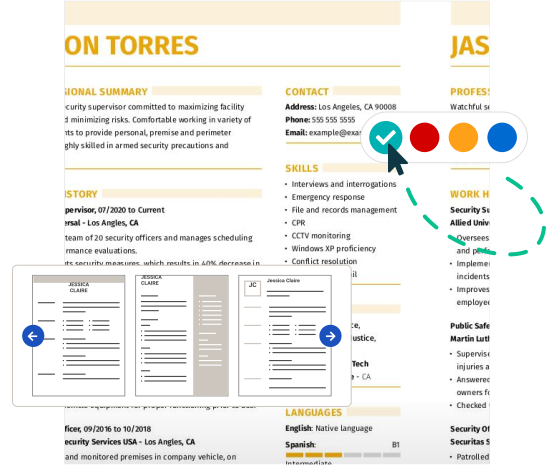
4. Use colors and design
When crafting your resume as an active directory administrator, incorporating color and design elements can make a significant difference. A visually appealing resume not only captures attention but also showcases your technical skills. Start by exploring various pre-made templates that align with the structured information you need to present. The combination resume format is particularly helpful, featuring a dedicated section for skills next to your work history, making key qualifications easy to spot.
Next, choose a professional color scheme that reflects your expertise while remaining readable. Subtle hues like slate gray or forest green can exude professionalism without being overly bold. If you prefer darker colors, consider using navy or charcoal for headings and section dividers.
Be mindful of avoiding bright or clashing colors that could distract from the content of your resume. Additionally, steer clear of any color schemes associated with competitors in the tech field to maintain a distinctive presence. This strategic use of design elements will help you create a powerful first impression in your job application process.
5. Keep your resume length to 1-2 pages
Resumes for an Active Directory Administrator should be clear, concise, and targeted. Ideally, keep your resume to one page. Recruiters often have limited time to review applications, so focus on the most relevant experience and skills that align with the job description. Highlight key achievements in managing Active Directory environments, user access controls, and security measures.
If you have extensive experience or are applying for higher-level positions, a two-page resume may be acceptable. For instance, if you've led significant projects or teams over several years in IT administration, showcasing those contributions can justify extra space. Academic roles often require a CV instead of a standard resume due to their need for detailed information on publications and research.
Always tailor your content to what’s most relevant to the role you're pursuing while maintaining clarity and professionalism.
FAQ
Do I need to include a cover letter with my resume?
Writing a cover letter can significantly improve your job application, even if it’s not mandatory. It allows you to elaborate on your skills and experiences as an active directory administrator, helping you stand out among other applicants.
To kickstart your writing process, take a look at our selection of cover letter examples that provide inspiration tailored to various tech roles.
When you're prepared to craft your own letter, don’t forget to use our Cover Letter Builder, which offers step-by-step assistance to ensure you create a compelling narrative that resonates with employers.
What is the best resume format?
Choosing the right resume format depends on your individual needs and career stage. The three primary formats are chronological, functional, and combination. Each serves a unique purpose and can improve your application based on your experience and skills.
The chronological format is ideal for those with extensive work history, showcasing job titles in order. The functional format focuses on skills and achievements, making it perfect for entry-level applicants or those changing careers. Finally, the combination format offers a balanced approach for mid-career professionals by mixing relevant work experience with key skills.
How long should my active directory administrator resume be?
As an active directory administrator, your resume should ideally be one page long. This length helps ensure that hiring managers can quickly identify your most relevant skills and experiences.
Focus on showcasing your expertise in user management, security protocols, and system configurations. Highlight recent projects and certifications related to Active Directory, as these will resonate with recruiters.
It's best to eliminate outdated technical skills or unrelated job experiences that don't directly pertain to the role. A two-page resume may be warranted if you have substantial experience in senior roles or specialized certifications that significantly improve your candidacy.
In such cases, additional detail about your achievements can provide valuable context for potential employers.
What’s the difference between a resume and a CV?
A resume is a brief, one-page document that focuses on relevant skills and work experience tailored for the job you're applying for.
In contrast, a CV is a more detailed document that can range from two to six pages, primarily used in academic and research contexts. It includes your complete work history, educational background, publications, conferences, and other professional achievements. If you're looking to create this type of document, knowing how to write a CV is essential.
When you need to write a CV, exploring CV examples can be incredibly helpful in understanding the structure and content required for your field.
Build a custom resume in minutes with our professional templates and expert tips.
Natalia Merced
CPRW, Career WriterNatalia is a Certified Professional Resume Writer (CPRW) and member of the Professional Association of Resume Writers & Career Coaches and has worked in the career industry for more than two years providing comprehensive guidance on resume writing and job search strategies for individuals across diverse career paths. She holds a master's degree in counseling psychology and a bachelor's degree in public relations and advertising and is passionate about helping job seekers present their professional story effectively through well-crafted resumes and cover letters that demonstrate their value, skills, and experience to potential employers. Some of her work has been featured on JobHero's resume examples career center.
More Resources


By Gabriela Barcenas | CPRW, Career Writer

By Natalia Merced | CPRW, Career Writer



By Gabriela Barcenas | CPRW, Career Writer