-
-
Sort through our administrative resume examples to see what works best for you.
-
Our sales resume examples can help you write the best possible resume.
-
Explore our food service resume examples to show your skills effectively.
-
Start crafting your job-winning resume with our teaching resume examples.
-
-
-
Use our administrative cover letter examples for ideas on writing your own.
-
Use our sales cover letter examples to effectively show your sales accumen.
-
Write your job-winning cover letter following our nursing cover letter examples.
-
Learn to tell your story in education using our teaching cover letter examples.
-





- Our customers have been hired by*


Entry-Level Office Admin Resume
This resume example showcases the transferable skills and achievements of career changers, making it an ideal choice for those moving into office admin roles.

Why this resume works:
A skills-focused resume is perfect for those new to office administration, returning after a hiatus, or transitioning careers.

Mid-Career Office Admin Resume
This office admin resume example is perfect for professionals with relevant experience seeking to improve their skills and take on more challenging responsibilities in a dynamic work environment.
Why this resume works:
This applicant highlights a track record of improving outcomes across multiple settings.

Experienced Office Admin Resume
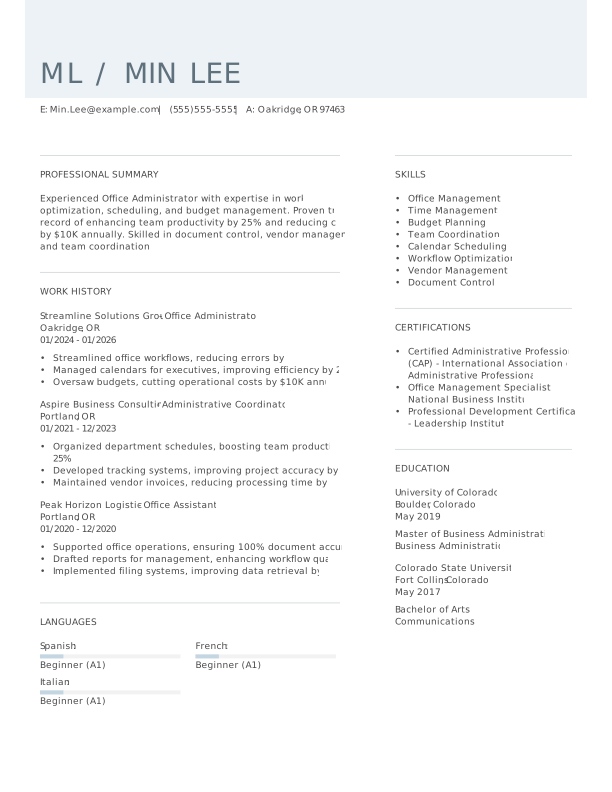
This office admin resume example showcases a proven track record in improving operational efficiency and cost management, ideal for professionals targeting senior administrative roles.
Why this resume works:
Leadership roles and advanced certifications underscore the ability to manage complex scenarios.

Looking for something else?
Create Your Standout Resume Today
Use our resume examples for inspiration on organization, color, and design—and learn how to summarize your office admin skills and experience with confidence.
How to Write an Office Admin Resume
Learning how to write a resume is important for showcasing your unique value as an office admin, rather than merely listing your qualifications. By emphasizing your specific skills and experiences, you can create a strong impression that stands out to potential employers.
In the following sections, we will provide resume tips to guide you through the process. Expect step-by-step advice covering everything from essential formatting to highlighting your relevant experience and skills.
Start with your contact info
The header section contains all your contact information, prominently placed at the top of your resume. Begin with your name in a larger, bold font to capture attention immediately. Consider using a clean layout and contrasting colors for effective visual appeal that aligns with professional standards.
Next, include vital contact details such as your email address, phone number, and general location; city and state are sufficient. This information is essential for employers to reach you quickly and helps ensure compatibility with applicant tracking systems (ATS) that filter applicants based on their proximity to job locations.
Finally, think about adding links to relevant certifications or online profiles like LinkedIn if they improve your application. These optional resources can provide additional context about your qualifications and experience, helping you stand out by showcasing skills that are particularly relevant to an office admin role.
Write a strong professional summary
A professional summary serves as a concise introduction to your qualifications and skills, positioned right below your contact details on your resume. Since this is the first section recruiters see, it is important for capturing their attention.
In this brief overview, include key achievements and tailor the content to reflect the specific job you’re applying for. Customizing this section demonstrates your genuine interest in the role and highlights how your background aligns with the company’s needs.
To craft a strong summary, consider reviewing sample resumes that showcase resume summary examples. These examples can provide inspiration for structuring your own unique statement that stands out to potential employers.
Strong vs weak office admin summary
Strong

"Organized and proactive office admin with over four years of experience in dynamic office environments. Proven ability to streamline processes, manage schedules, and improve communication between departments, resulting in a 20% increase in operational efficiency. Skilled in Microsoft Office Suite and CRM software, with a strong focus on customer service and administrative support. Certified in office management techniques and recognized for fostering a positive workplace culture."
Why this example works: This summary clearly outlines the job seeker's relevant experience, highlights measurable achievements like increased efficiency, emphasizes key skills such as process streamlining and software skill, and incorporates industry-specific keywords.
Weak

"Office administrator seeking a position to use my skills and assist with office tasks. I have experience in various office environments and enjoy collaborating with others."
Why this example doesn't work: This professional summary is weak due to its vague language and failure to highlight specific abilities, experiences, or relevant technical skills related to the role of an office administrator.

Craft a personal mission statement that reflects your organizational skills and dedication to supporting team success. By aligning it with your employer's values, you can illustrate how you contribute positively beyond just administrative tasks, showcasing your commitment to the overall goals of the office.
Share your work history
Listing your work history in reverse chronological order is essential as it allows employers to see your most recent experience first. This format showcases your career growth and skills development, making it easier for recruiters to evaluate your fit for the role. Additionally, it emphasizes your latest accomplishments and relevance to the job you are applying for.
When listing your work history, focus on:
- Job title and company name
- Dates of employment (month and year)
- Key responsibilities (What did you do on a daily basis?)
- Achievements and contributions (What did you accomplish? Did you improve processes, reduce costs, or increase efficiency?)
- Measurable results (Use numbers when possible, such as "reduced patient wait times by 15%.")
Finally, ensure that you use strong action verbs to improve the impact of your descriptions.
Strong vs weak office admin work history
Strong
Office Administrator, Tech Solutions Inc.
2018–2023
- Streamlined office operations, resulting in a 25% increase in overall efficiency and productivity.
- Managed scheduling for a team of 15, ensuring timely communication and coordination of daily tasks.
- Implemented a new filing system that reduced document retrieval time by over 40%.
Why this example works: The applicant includes specific accomplishments and quantifiable outcomes in their work history. This allows hiring managers to better assess the applicant’s expertise, skills, and fit for the role
Weak
Office admin
[Company Name]
- Handled office tasks and maintained files.
- Assisted with various administrative duties.
Why this example doesn't work: This entry is ineffective because it does not specify the scope of responsibilities or provide context about the office environment. The tasks are too generic, lacking details on specific accomplishments or challenges faced, making it difficult for employers to understand the applicant's skill and impact in the role.
Add your resume to LinkedIn to improve your professional reach. In the summary, showcase your organizational skills and relevant experience, and join industry-related groups to network with other office admins and potential employers looking for talent like yours.
Highlight your key skills
The skills section of your resume is essential for demonstrating your qualifications as an office admin. Here's a rundown of various skill types and their significance in improving your candidacy:
- Soft skills are personal attributes that indicate how you collaborate with others, such as organization, communication, and problem-solving. For office admins, traits like attention to detail and multitasking are important as they improve workflow efficiency and support team dynamics in a busy environment.
- Hard skills are specific administrative abilities developed through training or experience. Examples for an office admin include skill in Microsoft Office Suite, data entry accuracy, calendar management, and effective communication with clients and colleagues.
- Technical skills for an office admin involve expertise with various tools and technologies essential for daily operations. Examples include Microsoft Office Suite (Word, Excel, PowerPoint), Google Workspace applications, and project management software like Asana or Trello.
For an office admin resume, new professionals should list their skills section near the top to showcase their strengths despite limited experience. In contrast, experienced applicants can position the skills section after work history since their experience highlights their abilities.
Top 15 skills for your office admin resume
When preparing your resume, it's important to choose skills that align with the demands of office administration. Focus on a mix of soft skills, such as organization and communication, alongside hard skills like skill in office software. Including transferable skills will also demonstrate your ability to adapt and thrive in different environments.
Below is a list of the 15 most popular skills for office admins, based on insights from JobHero users. These skills are essential for standing out in the job market and can help highlight your qualifications.
Build your education section
The education section's importance varies with experience and industry. For seasoned office administrators, emphasize your extensive work history over formal education, especially if your positions do not mandate specific degrees. You might position this section toward the end of your resume or omit it altogether if applicable.
Conversely, recent graduates should prioritize their education as it serves as a primary qualification. Position this section at the top of your resume and include relevant coursework, projects, or internships that demonstrate your skills.
In specialized fields, such as healthcare administration, showcasing advanced degrees or certifications is important. Highlight these achievements prominently to signal expertise and commitment to prospective employers. Tailoring this section can set you apart in a competitive job market.
20 action verbs to add to your resume
Using action verbs in your resume significantly improves its strength by illustrating your experiences and achievements. These verbs create a dynamic tone, making your qualifications more engaging to potential employers in the office admin field.
When selecting these verbs, it’s important to align them with the skills highlighted in job postings. This focus ensures that your resume resonates with hiring managers and demonstrates your suitability for the role.
- Organized
- Scheduled
- Facilitated
- Processed
- Streamlined
- Executed
- Monitored
- Corresponded
- Improved
- Oversaw
- Resolved
- Coordinated
- Updated
- Supported
- Trained
- Managed
- Reviewed
- Implemented
- Communicated
- Collaborated
Consider additional resume sections
While your core resume provides the most critical information, adding targeted sections can showcase your unique qualifications. These sections help hiring managers quickly identify your skills, experiences, and achievements that go beyond standard resume entries.
Here are optional sections we tend to see on office admin resumes:
- Technical skills: List software and tools you are proficient in, such as Microsoft Office, CRM systems, or data management software.
- Certifications: Detail any relevant certifications like Certified Administrative Professional (CAP) or Project Management Professional (PMP).
- Professional development: Highlight workshops, seminars, or courses you've completed that improve your administrative capabilities.
- Achievements: Describe specific accomplishments such as process improvements or successful project completions that demonstrate your effectiveness.
- Memberships: Include any professional organizations you belong to that relate to administration or business management.
5 Tips for Formatting Your Resume
Proper resume formatting is important for job seekers as it improves the overall presentation and readability of your application. Using ATS-friendly resume templates can significantly improve your chances of catching a recruiter's eye while ensuring that your resume passes through automated screening processes.
1. Watch your line spacing and margins
Proper spacing helps your resume look clean and organized, making it easier for hiring managers to read. A well-spaced resume can improve the overall presentation and professionalism of your application.
- Keep margins between 0.5" to 1.0" for optimal visibility.
- Use single spacing between paragraphs and bullet points to maintain clarity.
- Increase space to 1.5" or double-space between sections for better separation.
2. Use a professional font
Choosing the resume font for your resume is important as it influences first impressions. Opt for professional fonts like:
- Arial
- Helvetica
- Verdana
- Garamond
- Trebuchet MS
- Georgia
Consider using a bolder or larger font for your name at the top to improve visibility and make a strong statement.
3. Organize your resume sections
A resume for an office admin should be clear and easy to navigate. Use bullet points to present your duties and achievements. Start each bullet point with a strong action verb, such as "Coordinated office activities to improve team productivity," which specifies what you did while showcasing the impact.
Highlight measurable accomplishments that demonstrate your value. For example, "Reduced supply costs by 20% through strategic vendor negotiations" illustrates your ability to save resources and improve efficiency. This kind of detail helps potential employers see the tangible benefits you bring.
To ensure your resume is ATS-friendly, run it through an ATS resume checker. This tool will help identify any formatting or keyword issues, ensuring your application meets the standards necessary to get noticed in a competitive job market.
4. Use colors and design
Incorporating color and design elements into your resume can significantly improve its effectiveness, especially in an office admin role. A well-structured resume not only looks appealing but also helps to communicate your professional skills clearly.
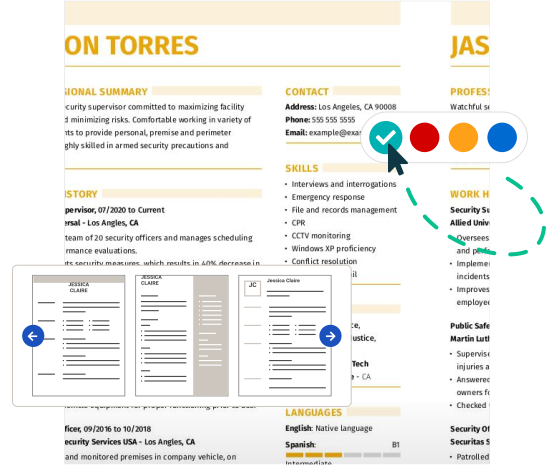
Begin by searching for pre-made resume templates that resonate with your organizational style. The combination resume format is particularly useful as it features a dedicated colored section that showcases your skills alongside work experience, making it easy for employers to identify your strengths.
Next, choose a professional color scheme that aligns with the corporate environment. Opt for colors like navy blue or charcoal gray that convey reliability and professionalism. These shades can be used for headings or borders without overwhelming the reader.
Avoid using bright colors or overly flashy designs that may distract from the content of your resume. Additionally, steer clear of any colors associated with competitors or those that could compromise readability. By focusing on these design principles, you can create a polished and compelling resume tailored to the office admin position.
5. Keep your resume length to 1-2 pages
Resumes should generally be one page long. This length ensures clarity and keeps the reader’s attention, as many recruiters take only seconds to review each resume. Focus on showcasing your most relevant experiences and achievements. Highlight positions that align with the job you're targeting, and avoid redundancy by not repeating similar tasks across roles.
However, there are exceptions where a two-page resume may be suitable. For instance, if you have extensive experience in your field or are applying for senior roles like a director or executive position, you might need extra space to convey your accomplishments effectively.
In academia or specialized fields, consider using a CV instead of a traditional resume to provide comprehensive details about your qualifications and research contributions.
FAQ
Do I need to include a cover letter with my resume?
Writing a cover letter allows you to showcase your unique qualifications and personality, setting you apart from other applicants. It adds depth to your application and allows you to explain aspects of your resume more fully.
If you're unsure where to begin, explore our collection of cover letter examples for inspiration tailored to various roles and industries. When you're ready to create your own, consider using our Cover Letter Builder for easy, step-by-step guidance.
What is the best resume format?
Selecting the appropriate resume format is largely dependent on your specific circumstances and career aspirations. The three main formats—chronological, functional, and combination—each cater to different job seekers' needs.
For individuals with extensive work history, the chronological format is ideal as it highlights experience over time. In contrast, the functional format puts an emphasis on skills and qualifications, making it a great choice for entry-level job seekers or those changing careers.
Lastly, the combination format strikes a balance between experience and skills, effectively catering to mid-level professionals or individuals transitioning between industries.
How long should my Office Admin resume be?
For office admin professionals, a one-page resume is often ideal, especially if you have less than 10 years of experience. Hiring managers typically skim through numerous resumes quickly, so keeping your document concise and focused on key qualifications can help you stand out.
Highlight relevant administrative skills, software proficiencies, and recent work experiences. Emphasize roles that showcase your organizational abilities and communication skills. Trim away outdated experiences and irrelevant job details to maintain clarity.
A two-page resume may be suitable if you're applying for senior positions or roles with high-level responsibilities where extensive experience is important. In such cases, the extra space allows you to elaborate on significant accomplishments and specialized skills.
Should I use the same resume for every job?
Using the same resume for every job application is not advisable. Customizing your resume significantly increases your chances of standing out to potential employers. Tailor key sections like your summary and skills to align with the specific job description.
Focus on using relevant keywords that reflect what the employer is looking for, as many companies rely on ATS to filter resumes based on these terms. Highlight experiences that directly relate to the position and ensure you're emphasizing the skills mentioned in the job posting.
This targeted approach not only makes your application more appealing but also shows that you have a genuine interest in the role.
Build a custom resume in minutes with our professional templates and expert tips.
Gabriela Hernandez
CPRW, Career WriterGabriela is a Certified Professional Resume Writer (CPRW) and member of the Professional Association of Resume Writers & Career Coaches and has worked in the career industry for more than four years providing comprehensive guidance on resume writing and job search strategies for individuals across diverse career paths. She holds a bachelor's in journalism and is passionate about helping job seekers present their professional story effectively through well-crafted resumes and cover letters that demonstrate their value, skills, and experience to potential employers. Some of her work has been featured on JobHero’s resume examples career center.
More Resources


By Gabriela Barcenas | CPRW, Career Writer


By Natalia Merced | CPRW, Career Writer


By Gabriela Barcenas | CPRW, Career Writer